Since we know how to create a new page and get onto the Divi Page builder, we will quickly go over getting to the same point with an existing page.
Navigate back to the admin screen and head to the ‘Pages’ section where you have the list of pages and hover over an existing page.
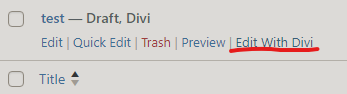
Like this one, you will see a button to ‘Edit With Divi’ which will load you straight into the Divi page builder, similar to last topic!
Quick note: You should see ‘Divi’ next to the page title (test – Draft, Divi in this example), which is a quick way to identify that the page you’re looking at has been built with Divi and can be edited with Divi.